Laminar Flow
1
In the Model Builder window, under Component 1 (comp1) click Laminar Flow (spf).
2
In the Settings window for Laminar Flow, locate the Domain Selection section.
3
From the Selection list, choose Vapor Cavity.
4
Locate the Physical Model section. From the Compressibility list, choose Compressible flow (Ma<0.3).
5
In the
p
ref
text field, type
p_ref
.
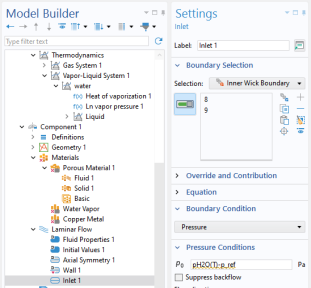
Inlet 1
A pressure condition is applied on the cavity boundary, it is set equal to the vapor pressure of water. By not suppressing backflow vapor is allowed to enter at the hot side and exit at the cold side.
1
In the Physics toolbar, click
Boundaries and choose Inlet.
2
In the Settings window for Inlet, locate the Boundary Selection section.
3
From the Selection list, choose Inner Wick Boundary.
4
Locate the Boundary Condition section. From the list, choose Pressure.
5
Locate the Pressure Conditions section. In the
p
0
text field, type
pH2O(T)-p_ref
.
6
Clear the Suppress backflow checkbox.
Initial Values 1
1
In the Model Builder window under Component 1 > Laminar Flow, click Initial Values 1.
2
In the Settings window for Initial Values, locate the Initial Values section.
3
In the
p
text field, type
p_ref
.