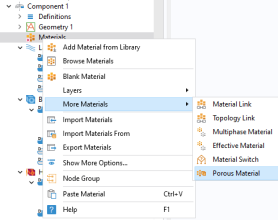
Materials
Add a Porous Material for use in the wick, two subfeatures are added to the Porous Material node: one for the fluid and one for the solid.
Porous Material 1
1
2
3
Fluid 1
1
2
3
Solid 1
1
2
3
In the θs text field, type 1-wick_porosity.
The material for the wick is now defined, continue to add links to water vapor and copper.
Water Vapor
1
2
In the Settings window for Material Link, type Water Vapor in the Label text field.
3
4
5
Copper Metal
1
2
In the Settings window for Material Link, type Copper Metal in the Label text field.
3
4
Now that the geometry, selections, and materials are in place, go on to set up the physics.