Heat Transfer in Fluids (ht)
Finally compute the flow and heat transfer in the test apparatus using the average values for the mixture properties.
1
In the Model Builder window, under
Component 1 (comp1) >
Heat Transfer in Fluids (ht) click
Fluid 1.
2
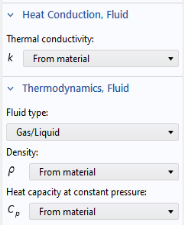
In the Settings window for Fluid, locate the Heat Conduction, Fluid section.
3
From the
k
list, choose User defined. In the associated text field, type
kC
.
4
Locate the Thermodynamics, Fluid section. From the Fluid type list, choose Gas/Liquid.
5
From the
ρ
list, choose User defined. In the associated text field, type
rhoC
.
6
From the
C
p
list, choose User defined. In the associated text field, type
CpC
.