Material for Fluid Domain
Apply the material to the fluid domain. Also, use the defined parameters to specify the mixture composition. This makes it easy to vary the composition.
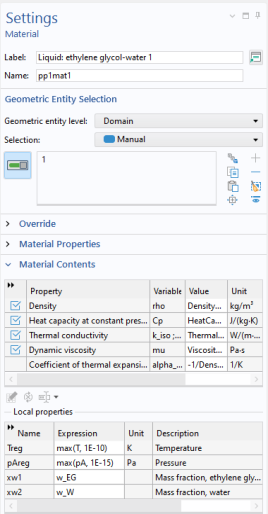
Liquid: ethylene glycol-water 1 (pp1mat1)
1
In the Model Builder window, expand the Component 1 (comp1) >
Materials node, then click the created material
Liquid: ethylene glycol-water 1 (pp1mat1).
2
Select Domain 1 only. Select
2
in the Geometric Entity Selection section, click the minus sign.
3
Locate the Material Contents section.
4
Find the Local properties subsection. In the table, enter the following settings,
:
Name
Expression
Unit
Description
Property group
xw1
w_EG
Mass fraction, ethylene glycol
Basic
xw2
w_W
Mass fraction, water
Basic
Now apply boundary conditions for turbulent flow and heat transfer.
 Materials node, then click the created material
  Liquid: ethylene glycol-water 1 (pp1mat1).