Global Definitions
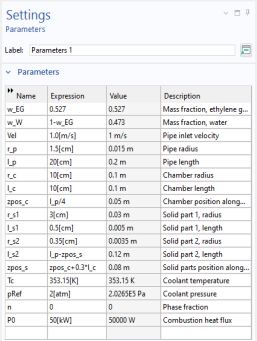
Load the needed parameters from a file. Alternatively, you could have created the parameters in the Parameter window directly.
1
In the Model Builder window, under
Global Definitions click
Parameters 1.
2
In the Settings window for Parameters, locate the Parameters section and click
Load from File.
3
Browse to the model’s Application Libraries folder and double-click the file
engine_coolant_properties_parameters.txt
.
The parameters from the txt-file are added to the table.
 Global Definitions click
  Parameters 1.
 Load from File.