Heat Transfer with Surface-to-Surface Radiation
1
In the Model Builder window, right-click on Component 1 (comp1) and select Add Multiphysics
.
2
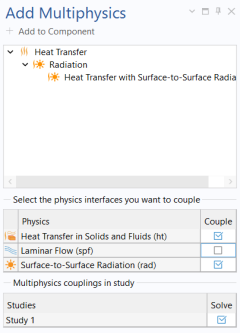
Go to the Add Multiphysics window.
3
Modify the physics interface selection so that only Heat Transfer in Solids and Fluids (ht) and Surface-to-surface Radiation (rad) interfaces are selected.
4
In the tree, select Heat Transfer > Radiation > Heat Transfer with Surface-to-Surface Radiation.
5
Click Add to Component in the window toolbar and close the Add Multiphysics window.
 .
.