Materials
Define the material properties in the newly created channel domain.
Air 1 (mat5)
1
In the Model Builder window, right-click Air (mat3) under Component 1 (comp1) > Materials and choose Duplicate
.
This creates a new instance of the Air material that will be applied to the domain selection corresponding to the channel.
2
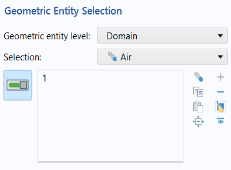
In the Settings window for Material, locate the Geometric Entity Selection section and select Domain in the Geometric entity level list.
3
Select Domain 1 only.
4
Click Create Selection
and, in the
Create
Selection
dialog, type
Air
in the
Selection
name
text field. Click OK.
 and, in the Create Selection dialog, type Air in the Selection name text field. Click OK.
 .
.