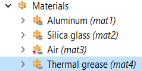
Materials
Now assume that thermal grease is used to avoid an air layer at the interface between the chip and the heat sink. Update the model in order to check how the cooling is improved by this change.
Thermal Grease
1
In the Home toolbar click Add Material
.
2
In the Add Material window under Built-In, click Thermal grease
.
1
Click Add to Component
.
2
Click again Add Material
In the Home toolbar to close the material tab.
3
In the Model Builder window, select Component 1 (comp1) > Materials > Thermal grease (mat4).
4
In the Geometric Entity Selection section, choose Boundary from the Geometric entity level list.
5
From the Selection list, choose Chip/Heat Sink Interface.
The red triangle on the Air material icon indicates that it is overridden by the Thermal grease material.
6
In the Home toolbar, click
Compute
.
 .
. .
. .
. .
. In the Home toolbar to close the material tab.