Remove the Old Study Sequence and Recompute
In order to generate new default plots related to the introduced mass transport, remove the old study sequence before recomputing.
1
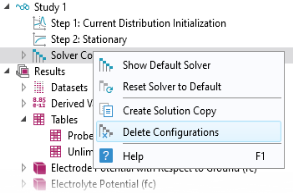
In the Model Builder window, under Study 1 right-click Solver Configurations and choose Delete Configurations.
2
In the Home toolbar, click
Compute.
 Compute.