Add Mass Transport and Fluid Flow to the Model
Now we start the second part of the tutorial to incorporate mass and momentum transport. Include mass transport using Maxwell-Stefan diffusion and momentum transport using Darcy’s Law in the O2 gas phase mixture.
Enable Diffusion and Darcy’s Law
1
In the Model Builder window, under Component 1 (comp1) click Hydrogen Fuel Cell (fc)
2
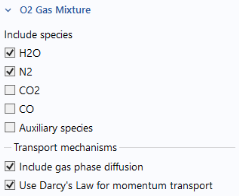
In the Settings window for Hydrogen Fuel Cell, locate the O2 Gas Mixture section.
3
Find the Transport mechanisms subsection. Select the Include gas phase diffusion checkbox.
4
Select the Use Darcy’s Law for momentum transport checkbox.
Set Initial Values for O2 Gas Phase
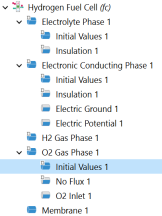
Inspect the settings of the O2 Gas Phase node. Note that since you are now including diffusion in the model, the composition values you specified earlier are no longer visible. (Settings for Diffusion are now present instead.) The initial and inlet conditions (composition and pressure) of the O2 gas phase mixture are now specified using child nodes. The gas composition is specified using the Humidified air option. Set up the initial and inlet conditions (composition and pressure) of the O2 gas phase mixture.
1
Under O2 Gas Phase 1, click Initial Values 1.
2
In the Settings window for Initial Values, locate the Initial Composition section.
3
From the Mixture specification list, choose Humidified air.
4
In the
RH
hum
text field, type
RH
.
5
In the
T
hum
text field, type
T
.
Specify the Inlet for O2 Gas Phase
The same parameter values that were used for the initial values are used to specify the inlet mole fractions.
1
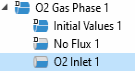
In the Model Builder window, click O2 Gas Phase 1.
2
In the Physics toolbar, click
Attributes and choose O2 Inlet.
3
In the Settings window for O2 Inlet, locate the Boundary Selection section.
4
From the Selection list, choose Inlet.
5
Locate the Inlet Flow Type section.
6
From the Inlet flow type list, choose Mixture composition constraint.
O2 Gas Diffusion Electrode 1
Finally, set up the gas transport properties in the O2 Gas Diffusion Electrode node.
1
In the Model Builder window, click O2 Gas Diffusion Electrode 1.
2
In the Settings window for O2 Gas Diffusion Electrode, locate the Gas Transport section.
3
In the
ε
g
text field, type
eps_gas
.
4
In the
κ
g
text field, type
perm
.
Note that the effect of varying concentration is automatically taken into account in the built-in thermodynamic and kinetic expressions of the oxygen reduction reaction in the O2 Gas Diffusion Electrode Reaction child node, and appropriate mass sources resulting from the electrochemical reaction in the O2 gas phases mixture are automatically defined. Hence, no additional settings are required in this node.
 Attributes and choose O2 Inlet.