Model Wizard
1
If COMSOL Multiphysics is already open, you can start the Model Wizard by selecting New
from the File menu and then click Model Wizard
.
2
In the Space Dimension Window click the 1D button
.
3
In the Select Physics tree under Electrochemistry, click Electroanalysis (tcd)
.
4
Click Add.
5
This model will solve for the two concentrations of a redox couple. Change the default concentration variable names to cA and cB in the Concentrations table.
6
Click the Study
button.
7
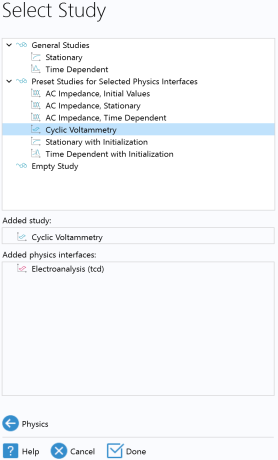
In the tree under Preset Studies for Selected Physics Interfaces, select Cyclic Voltammetry
.
8
Click Done
when the Added study and Added physics interfaces lists look as to the right.
 from the File menu and then click Model Wizard
  .
.
 .
. .
. button.
 .
. when the Added study and Added physics interfaces lists look as to the right.