Global Definitions
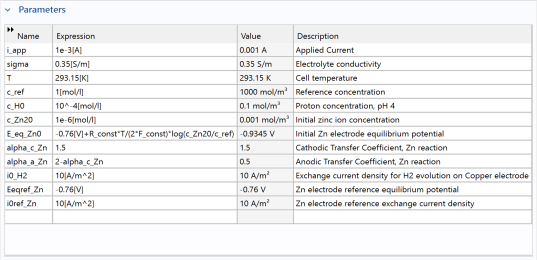
Load the model parameters from a text file.
The location of the files used in this exercise may vary based on the installation. For example, if the installation is on your hard drive, the file path might be similar to
C:\Program Files\COMSOL\COMSOL64\Multiphysics\applications\
.
Parameters
1
In the Model Builder under Global Definitions, click Parameters 1
.
Note:
On Linux and Mac, the Home toolbar refers to the specific set of controls near the top of the Desktop.
2
In the Settings window for Parameters click the Load from File button
.
3
Browse to the application library folder, Electrochemistry Module > Tutorials, and double-click the file
orange_battery_parameters.txt
.