Generating a Tetrahedral Mesh
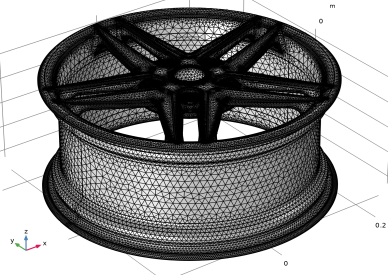
As a final step generate the default tetrahedral mesh for the wheel rim.
1
In the Model Builder window, under Component 1 click Mesh 1.
Remaining narrow face regions are detected by the Geometry Cleanup.
2
In the Geometry Cleanup dialog that opens, click Clean up Automatically to automatically clean up the geometry.
The remaining narrow face regions are collapsed by the Remove Details 1 node added by the cleanup.
3
In the Model Builder, click Mesh 1 and change the Element size to Extra coarse.
1
Click Build Mesh
.
The generated mesh consists of approximately 152,000 elements and there should be no Information nodes appearing under the Mesh 1 node due to small geometric entities.
 .
.