The Geometry Sequence
1
Start COMSOL Multiphysics, then from the File menu select Open.
2
Open the file
bracket_geometry.mph
, which is found in your COMSOL installation directory, under the folder
applications/Design_Module/Tutorial_Examples
.
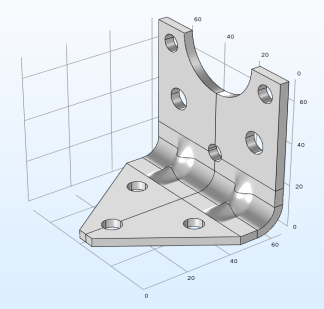
The file contains a sequence of geometry operations that results in the geometry of the bracket displayed below.
3
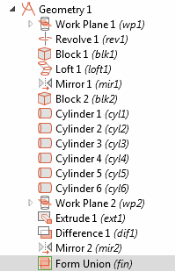
In the Model Builder, under the node Component 1 > Geometry 1 you can see the sequence of geometry operations that builds the bracket.
The sequence starts by creating the elbow, which is the output of the Revolve 1 operation. The output of the Loft 1 operation and its mirror (Mirror 1) connect the elbow to the two wings, which are the Block 1 and Block 2 operations. The holes in the bracket are generated by subtracting the cylinders from the geometry. Finally the Mirror 2 operation generates the full bracket geometry.
4
To study how the geometry is built, step through the sequence of operations by right-clicking on a node then selecting Build Selected.