|
1
|
|
4
|
Enter range(0.2, 0.05, 0.8) in the Parameter value list column. This will compute solutions for pore saturation values from 0.2 to 0.8, with a step length of 0.05.
|
 .
.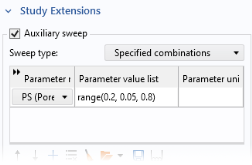
 to choose PS (Pore saturation) as the Auxiliary parameter.
 (or click Study 1 and press F8).