|
1
|
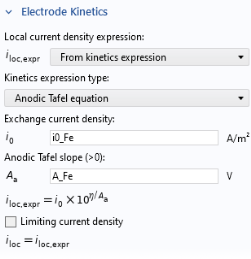
In the Model Builder window, under Component 1 (comp1) > Tertiary Current Distribution, Nernst–Planck (tcd) click Electrolyte 1.
 |
|
1
|
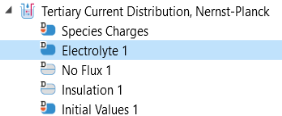
In the Model Builder window, under Component 1 (comp1) > Tertiary Current Distribution, Nernst–Planck (tcd) click Electrolyte 1.
|
|
2
|
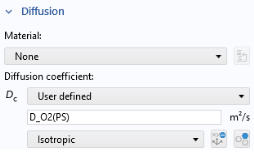
In the Settings window for Electrolyte, locate the Diffusion section. In the Dc text field, type D_O2(PS).
 |
|
3
|
|
4
|
|
1
|
In the Model Builder window, under Component 1 (comp1) > Tertiary Current Distribution, Nernst–Planck (tcd) click Initial Values 1.
|
|
2
|
|
3
|
|
1
|
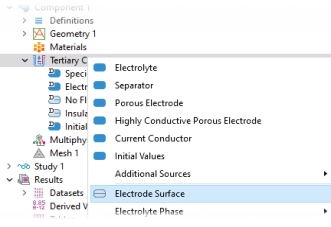
In the Model Builder window, right-click Tertiary Current Distribution, Nernst–Planck (tcd) and choose Electrode Surface.
 |
|
6
|
|
5
|
|
2
|
Press F2 on the keyboard to rename the node (or right-click the node and choose Rename). Enter Oxygen reduction as the new name.
|
|
4
|
In the Settings window for Electrode Reaction, locate the Equilibrium Potential section. In the Equilibrium potential Eeq text field, enter Eeq_O2.
|
|
-
|
|
-
|
|
2
|
Press F2 to rename Electrode Reaction 2 to Iron oxidation. Click OK.
|
|
3
|
In the Settings window for Electrode Reaction under Equilibrium Potential, enter Eeq_Fe in the Equilibrium potential Eeq text field.
|
|
-
|
|
-
|
|
1
|
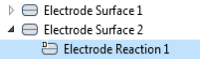
In the Model Builder window, under Component 1 (comp1) > Tertiary Current Distribution, Nernst–Planck (tcd) right-click Electrode Surface 2 and choose Electrode Reaction.
|
|
2
|
Press F2 to rename Electrode Reaction 3 to Hydrogen evolution. Click OK.
|
|
3
|
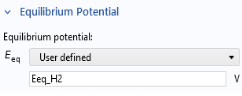
In the Settings window for Electrode Reaction under Equilibrium Potential, enter Eeq_H2 in the Equilibrium potential Eeq text field.
 |
|
-
|
|
-
|
|
1
|
In the Model Builder window, right-click Tertiary Current Distribution, Nernst–Planck (tcd) and choose Electrolyte > Concentration.
|
|
3
|
|
4
|
|
5
|
 and choose Electrode Surface
  .
. .
.
 .
.