|
2
|
On the New page click Model Wizard (
 ) then click the 3D button ( ) then click the 3D button ( ) on the Select Space Dimension page. ) on the Select Space Dimension page. |
|
2
|
On the New page click Model Wizard (
) then click the 3D button () on the Select Space Dimension page. |
|
3
|
On the Select Physics page under Heat Transfer > Thermoelectric Devices click Thermoelectric Effect (
 ). ). |
|
4
|
|
5
|
|
1
|
|
2
|
|
3
|
|
4
|
In the Settings window, expand the Layers section. Add two layers to the table: Layer 1 with Thickness 0.1 mm and Layer 2 with Thickness 5.8 mm.
|
|
1
|
Right-click the Thermoelectric Effect node (
 ) and select Thermoelectric Model ( ) and select Thermoelectric Model ( ). This is in addition to the default node. ). This is in addition to the default node. |
|
2
|
In the Settings window for the second Thermoelectric Model, add the copper electrodes (domains 1 and 3) to the selection list under Domain Selection.
|
|
3
|
Under Thermoelectric Model replace the defaults with the following:
|
|
-
|
|
-
|
|
-
|
 |
The default Thermoelectric Model already has the correct values for bismuth telluride and is assigned to domain 2.
|
|
4
|
|
5
|
In the Settings window for Electric Potential, select boundary 3 (bottom surface) and keep the default Electric potential (0 V).
|
|
6
|
|
7
|
In the Settings window for Temperature select boundary 3. In the Temperature field replace the default with 273.15 K (0 degrees C).
|
|
8
|
|
9
|
In the Settings window for Electric Potential select boundary 10 (top surface). Enter an Electric potential of 0.05 V.
|
|
1
|
|
1
|
|
2
|
|
3
|
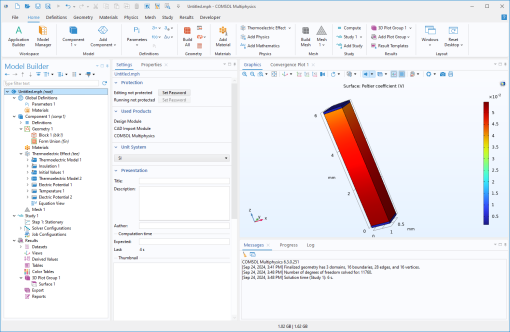
Under Model > Component 1 > Thermoelectric Effect choose a predefined expression; for example, the Peltier coefficient tee.P.
|
|
4
|
 ).
). ). Click
  ).
). ).
).  ) with
  ) and select
  ).
). ) and select
  ).
). ) and select
  ).
). ).
). ).
).