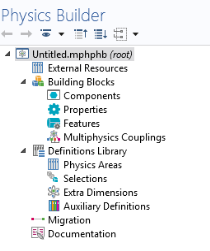
The Physics Builder window displays the tree containing the sequence of all physics and building blocks within a file.
The External Resources branch is useful to avoid reimplementing features, properties, or components.
Import previously created items stored in a different builder file. All items that you implement under the Building Blocks branch in a builder file can be used by any other builder file that imports it.
Use the Building Blocks branch to create a library of
Components,
Properties,
Features, and
Multiphysics Couplings that you can build physics interfaces (including multiphysics interfaces). The
Physics Builder Tools chapter describes the features and subfeatures available in detail.
The Definitions Library contains definitions of material property groups, physical quantities, and other definitions that are used by but are not part of a physics interface. There are these subbranches:
Physics Areas,
Selections,
Extra Dimensions, and
Auxiliary Definitions.
Migration, or backward compatibility, has to be considered in situations when you make changes to your physics interface design but still want users of the interface to use COMSOL model files created in the old
Version of the interface.