 ) selection outputs selections adjacent to specified geometric entities or selections. For example, select all domains adjacent to some boundaries or all boundaries adjacent to some domains.) selection outputs selections adjacent to specified geometric entities or selections. For example, select all domains adjacent to some boundaries or all boundaries adjacent to some domains.
 |
 ) to open an Add dialog that contains selections of the chosen geometric entity level that appear earlier in the geometry sequence. Select one or several of the selections and click OK; you can use the search bar to filter the list. Use the Move Up (
 ), Move Down (
 ), and Delete (
 ) buttons to organize the list.
|
•
|
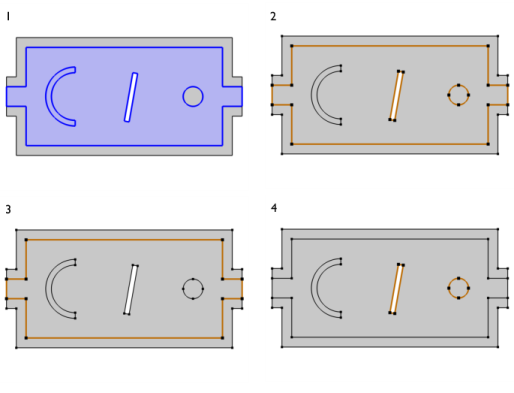
All (default) to select all exterior boundaries (see 2 in Figure 6-20).
|
|
•
|
Adjacent to outside to select the outer boundaries bounding the domain selection (see 3 in Figure 6-20).
|
|
•
|
Adjacent to inside to select the exterior boundaries that are adjacent to a cavity in the domain selection (see 4 in Figure 6-20).
|
|
•
|
None to not select any exterior boundaries.
 |
 |
The options Adjacent to outside and Adjacent to inside are not supported for virtual geometry, for imported meshes, and for mesh-based geometries.
|

 |