Running a COMSOL Model Manager Server and Client
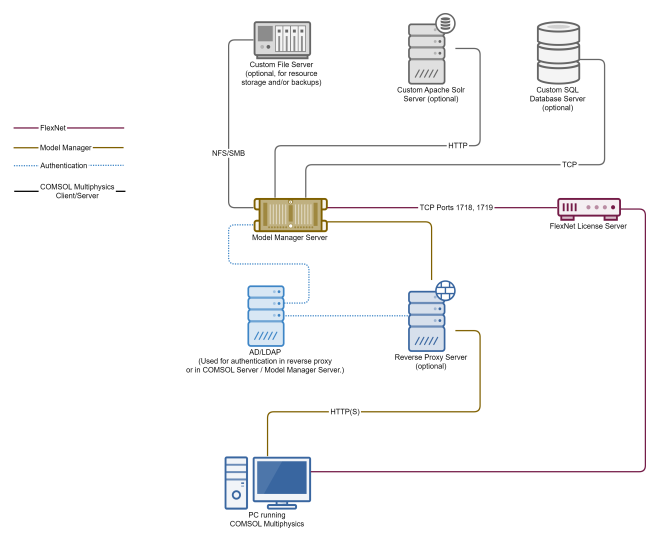
The following diagram shows how the COMSOL Model Manager Server can be connected to a computer running COMSOL Multiphysics, to a FlexNet license server, and to optional SQL database severs and custom file servers.
Figure 22-4:
Diagram showing a COMSOL Model Manager Server with its connected servers and a computer running COMSOL Multiphysics.
The diagram shows the setup for running COMSOL Multiphysics to a Model Manager server through a reverse proxy server. This configuration is useful for managing a corporate website a common login for the Model Manager server and other web-based tools in a corporate environment. The Model Manager can also manage its own logins through an AD or LDAP server. Running the Model Manager server in this way requires a license server and at least one FNL license. When using an FNL license for COMSOL Multiphysics, you also need to communicate with the license server from COMSOL Multiphysics. When using a CPU or NSL license, you typically use a local license server or a license file. The Model Manager server can use local storage and a local database but can optionally communicate with separate database servers and a separate custom Apache Solr server, and use a separate server for backup and storage.
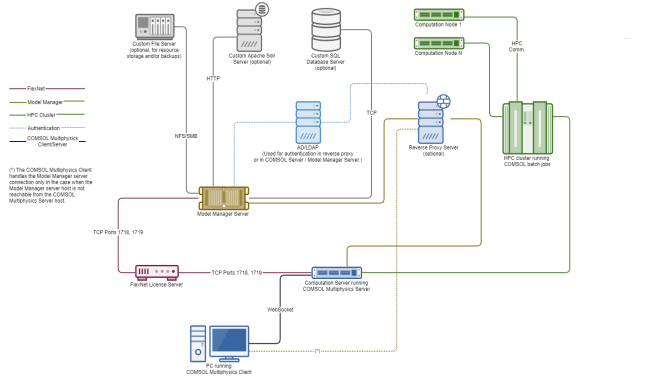
The following diagram shows a COMSOL Model Manager Server connected to a COMSOL Multiphysics client–server setup:
Figure 22-5:
Diagram showing a COMSOL Model Manager Server with its connected servers and COMSOL Multiphysics running in a client–server configuration.
The diagram shows a setup with where you run COMSOL Multiphysics client and COMSOL Multiphysics server on separate computers. This configuration requires an FNL license. Both the COMSOL Multiphysics server and the Model Manager server communicate with the license server. The diagram shows the optional reverse proxy server with communicating with an AD or LDAP user database server. (The Model Manager server can manage logins through AD or LDAP itself.) This figure also shows an optional HPC cluster as well as optional storage servers, database server, and a custom Apache Solr server.
For more information about setting up and running the Model Manager, see the
Model Manager Reference Manual
and the
Model Manager Server Manual
.