Running COMSOL Multiphysics in Client–Server Mode
The COMSOL Multiphysics client and server applications are available on all platforms.
Running COMSOL Multiphysics in Client–server Mode on the Same Computer
The COMSOL Multiphysics client and the COMSOL Multiphysics server can run on the same computer and with all available license types: named single user license (NSL), CPU-locked license (CPU), and floating network license (FNL). In this configuration, the COMSOL Multiphysics client and the COMSOL Multiphysics server run as separate processes within a single computer. The client and server communicate through a local TCP (Transmission Control Protocol) connection.
Running COMSOL Multiphysics in Client–server Mode on Different Computers
The COMSOL Multiphysics client and COMSOL Multiphysics server can also run on different computers. This configuration requires a floating network license (FNL).
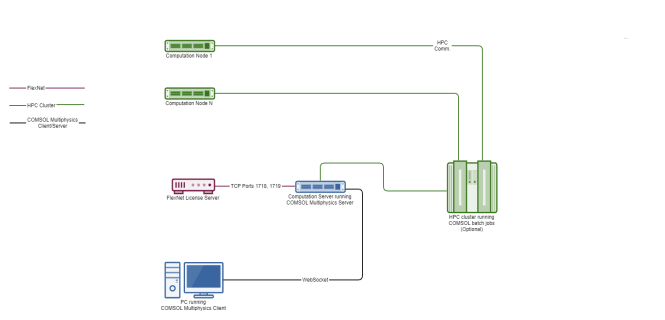
Figure 22-2:
Diagram showing the COMSOL Multiphysics client–server connections.
The diagram illustrates the client–server TCP connection between different computers and TCP connections to the default ports 1718 and 1719 for the license server. (A license server is required for the FNL license.) The diagram also illustrates that the COMSOL Multiphysics server can submit batch jobs to a HPC cluster. Typically, a separate network is used for the communication between the compute nodes and the head node.