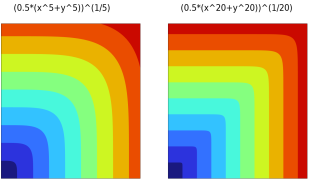
Add a P-norm node (

) by right-clicking a
Definitions node in a
Component and choosing it from the
Physics Utilities submenu. It is also available on the
Definitions ribbon toolbar, from the
Physics Utilities menu.
Enter the Expression whose maximum value is sought. The approximate maximum is made available as a global variable with the name specified in the
Name field. Choose the exponent
P in the approximation directly from the
Norm list or select
User defined to set an expression for the exponent. A larger norm value improves the approximation. In practice, however, norm values that are excessively large can cause problems for the solvers. When this happens, you can try to increase the exponent step by step using a parameter-dependent
User defined expression.
The default Quadrature method is
Gauss, which uses a pattern of integration points in the interior of mesh elements. Choose instead
Gauss-Lobatto to use a different pattern including points at mesh element nodes. These predefined patterns are constructed so that a polynomial of at most the specified
Integration order will be integrated exactly. If you have added custom Integration Rule nodes under
Global Definitions, these are also available in the
Quadrature method setting.
For the Gauss and
Gauss-Lobatto quadrature methods, choose a suggested
Integration order or
User defined which will expose the
Order expression field. The suggested even orders from
0 to
8 are available in all dimensions. The default is
4 which is appropriate for a second-order equation using quadratic shape functions. An order entered as a user-defined parameter expression must evaluate to an integer, but may be odd. The maximum order depends on the space dimension. It is
30 in 2D and
14 in 3D.
Choose a frame from the Integrate on frame list to set the volume element in the weak form integral. The default is
Spatial.

 .
.