Installing the License Manager
The license manager components are automatically installed when installing the COMSOL software unless otherwise specified on the Products page of the COMSOL installer; see Products Page. The checkbox for the license manager components can be found last in the list of software components.
If you want to install COMSOL on the same computer as the license manager and you did not choose to install the license manager as a service, first perform a complete COMSOL installation including the license manager software components.
If you want to install the license manager on a computer where running the COMSOL Installer is inconvenient, please contact COMSOL Support for access to the files needed for installing only the license manager.
License Manager Page
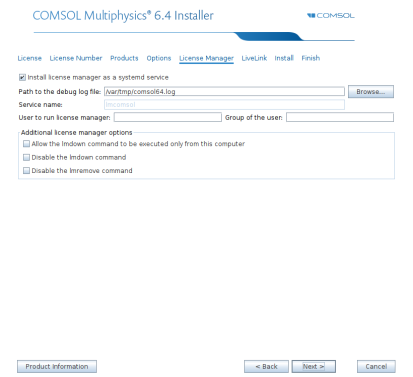
See License Manager Page for information about the license manager settings in the installer. For Linux, this page also contains some additional settings:
In the User to run license manager field, enter the username for the user on the computer that will run the license manager. If this field is empty, the root user runs the license manager, which is not recommended from a security point of view.
Note: The License Manager page only appears if the installer is started by a superuser (such as root or by using sudo) on a system that uses systemd.
To install only the license manager, follow the installation instructions for COMSOL earlier in this document, and on the Products page, clear all checkboxes except the one for the license manager.
When finished, skip the remainder of this section and continue with Starting the License Manager below.
automated license manager installation
Alternatively, the license manager can be installed using an automated installation process with minimal user interaction, see Automated Installation. Set licmanager = 1 in the answer file to install the license manager. It is also possible to automatically configure the license manager to run on systemd-based Linux distributions. Use licmanager.service = 1 in the setupconfig.ini file and provide values for the other licmanager.service.* lines.