Get and Set of 3D Camera Parameters
The following method code demonstrates how to programmatically retrieve and log the complete set of camera settings for the View with tag view1 in the Component with tag comp1. It captures parameters for: zoom angle, position, target, up vector, rotation point, view offset, manual grid flag, and axis spacings. This information can be used in order to at a later point restore the exact camera state in your application.
// Cache the camera feature
ViewFeature view1Camera = model.component("comp1").view("view1").camera();
 
// Retrieve zoom angle
zoomAngle = view1Camera.getDouble("zoomanglefull");
 
// Retrieve position vector
position = new double[3];
for (int i = 0; i < 3; i++) {
position[i] = view1Camera.getDouble("position", i);
}
 
// Retrieve target vector
target = new double[3];
for (int i = 0; i < 3; i++) {
target[i] = view1Camera.getDouble("target", i);
}
 
// Retrieve up vector
up = new double[3];
for (int i = 0; i < 3; i++) {
up[i] = view1Camera.getDouble("up", i);
}
 
// Retrieve rotationPoint vector
rotationPoint = new double[3];
for (int i = 0; i < 3; i++) {
rotationPoint[i] = view1Camera.getDouble("rotationpoint", i);
}
 
// Retrieve viewOffset
viewOffset = new double[2];
for (int i = 0; i < 2; i++) {
viewOffset[i] = view1Camera.getDouble("viewoffset", i);
}
 
// Retrieve manualGrid flag
manualGrid = view1Camera.getBoolean("manualgrid");
 
// Retrieve axis spacings
xSpacing = view1Camera.getDouble("xspacing");
ySpacing = view1Camera.getDouble("yspacing");
zSpacing = view1Camera.getDouble("zspacing");
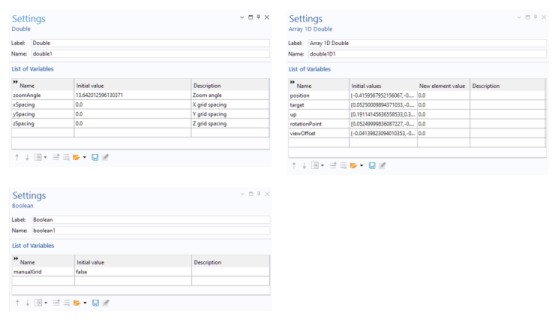
In this example, the variables are stored globally under the Declaration node, shown in the figures below.
The following method code shows how to restore the camera settings.
// Cache the camera feature
ViewFeature view1Camera = model.component("comp1").view("view1").camera();
 
// Restore zoom angle
view1Camera.set("zoomanglefull", Double.toString(zoomAngle));
 
// Restore position vector
for (int i = 0; i < position.length; i++) {
view1Camera.setIndex("position", Double.toString(position[i]), i);
}
 
// Restore target vector
for (int i = 0; i < target.length; i++) {
view1Camera.setIndex("target", Double.toString(target[i]), i);
}
 
// Restore up vector
for (int i = 0; i < up.length; i++) {
view1Camera.setIndex("up", Double.toString(up[i]), i);
}
 
// Restore rotation point vector
for (int i = 0; i < rotationPoint.length; i++) {
view1Camera.setIndex("rotationpoint", Double.toString(rotationPoint[i]), i);
}
 
// Restore view offset
for (int i = 0; i < viewOffset.length; i++) {
view1Camera.setIndex("viewoffset", Double.toString(viewOffset[i]), i);
}
 
// Restore manual grid flag
view1Camera.set("manualgrid", manualGrid);
 
// Restore axis spacings
view1Camera.set("xspacing", Double.toString(xSpacing));
view1Camera.set("yspacing", Double.toString(ySpacing));
view1Camera.set("zspacing", Double.toString(zSpacing));
 
selectNode(model.component("comp1").view("view1"));
In the last line of code, the call to selectNode ensures that the view is updated automatically.
The figure below shows these two methods, named StoreCamera and RestoreCamera respectively, as Method Call nodes in the Model Builder.
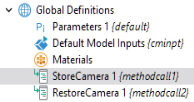
These two methods can be added to any 3D model in order to store and restore camera settings.
This example is part of a collection available for download:
www.comsol.com/model/application-programming-guide-examples-140771
The relevant file for this example is: