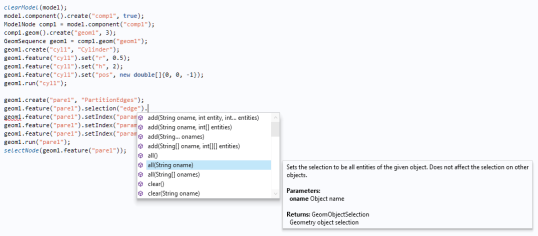
initializes the selection to be empty of type object. The second line then selects all objects with names in the array so. In general, a call to
init() without input argument means that the selection is for objects and
init(n), where
n=
0,
1,
2, or
3, means that the selection is for points, edges, faces, and domains, respectively. Note that in some cases
n=
-1 is used to denote the object level (instead of an empty input argument); see the
Programming Reference Manual.
The first example generates a cylinder and then inserts a PartitionEdges feature (
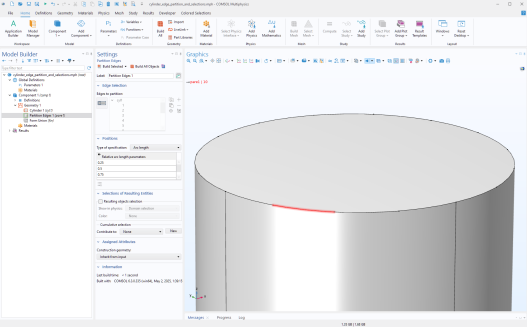
"pare1") to subdivide four specific cylinder edges at parametric positions 0.25, 0.50, and 0.75 along their lengths, runs the partition, and then selects the partition feature in the Model Builder for further operations. You can, for example, use such a partition, under the
Mesh node, to select edges for mesh refinement.
The all method can be used for most geometry features for selecting all geometric entities (domains, boundaries, edges, points). The following picture shows the results of the second example, zoomed in on one of the edges.
where objectName is the name of the geometry object and
entityNumbers is an integer vector of geometric entity numbers (vertices, edges, boundaries, or domains).
Selections applied to the finalized geometry differ from those applied to individual geometry objects within the geometry sequence under the Geometry node. Finalized geometry selections are used by Model Builder nodes such as
Materials,
Mesh, and physics interfaces like
Heat Transfer in Solids. They are also used under a model component, such as
Component 1, for defining
Variables,
Nonlocal Couplings, and other features that operate on the finalized geometry.
In the first line, the final argument 2 specifies that the selection targets entities of dimension
2, that is, boundary surfaces. Aside from this dimension specification, the syntax is similar to selections applied to individual geometry objects.
Here, the argument 3 in the first line refers to entities of dimension
3, corresponding to domains (volumes) in the geometry.
Selections created with model.component("comp1").selection() can be placed anywhere earlier in the code, as long as they are defined before the finalized geometry is created. This approach is generally preferred, as named explicit selections promote reuse and improve the clarity of the model structure.
To retrieve the geometric entities associated with physics feature selections, you can use the inputEntities() method. This should be done after either of the selection creation methods, whether by direct entity numbers or named explicit selections, has been called. The following code demonstrates this: