Operating System Methods
Operating system methods are used for accessing operating system information and commands from an application.
Executes the OS command with the given command (full path) and parameters. Returns everything the process printed to its out stream as a string. The execution is forcibly stopped after timeoutSec seconds if the command has not finished. To disable the timeout functionality, timeoutSec value 0 can be used. When applicable, the command is run server side.
Plays the sounds in the given file on the client. Only .wav files are supported; no external libraries are required.
Plays a signal at a given frequency hz and with given duration millis in milliseconds on the client.
Example Code
The line of code below plays one of the sounds available in the data/sounds folder of the COMSOL installation and has been embedded in the application and stored in the Sounds library.
playSound("embedded:///success_1.wav");
In the command sequence of a form object, this is equivalent to selecting a sound node under Libraries and clicking Run.
The line of code below opens a PDF file embedded in the application and stored in the File library.
fileOpen("embedded:///li_ion_battery_impedance.pdf");
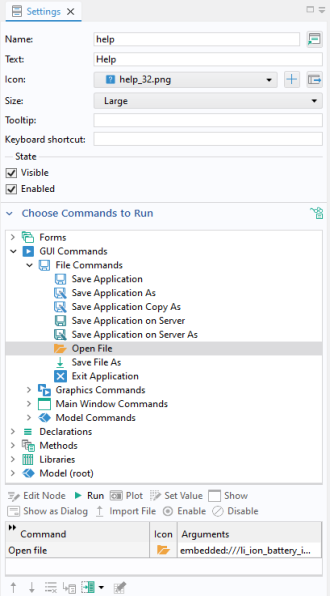
In the command sequence of a form object, this is equivalent to selecting an Open File node under GUI Commands > File Commands and clicking Run, as shown in the figure below.
This line of code opens the COMSOL home page in the default browser:
openURL("www.comsol.com");
This line of code runs an application by means of an OS command:
executeOSCommand("C:\\COMSOL64\\Multiphysics\\bin\\win64\\comsol.exe",     "-run", "C:\\work\\tubular_reactor.mph");