Data Source and Declaration
In the Java API, DataSource is the common interface for values defined under Declarations. The following DataSource interfaces are available:
Primitive: covers the declaration types Scalar, Array 1D, and Array 2D with base types String, Boolean, Integer, and Double.
ChoiceList: a set of selectable options.
UnitSet: a set of physical units.
GraphicsData: graphical output data.
Scalar, Array 1D, and Array 2D Methods
The methods in the following table apply to Scalar, Array 1D, and Array 2D declarations of types String, Boolean, Integer, and Double.
At runtime, these nodes are returned as DataSource objects that also implement Primitive. Use the typed getters and setters to read and write native Java values (for example, int[] or double[][]). Always select the accessor (get and set) that matches the declaration’s type.
DataSource Methods
Example Code
// Get a scalar double declaration
DataSource ds = app.declaration("var");
// The 'var' declaration is a scalar double so we use the getDouble method // to read its value.
double cur = ds.getDouble();
// Modifying the local field 'cur' does not affect the value stored in the // data source ds
cur = cur + 1;
// Set the value of the data source
ds.set(cur);
// Retrieve a DeclarationGroup object containing entries of the
// "string1" String declarations node
DeclarationGroup group = app.declaration().group("string1");
// Retrieve a DeclarationGroup object containing entries of the
// "string1" String declarations node under the given form
group = app.form("form1").declaration().group("string1");
// Get the value of the "svar" declaration among the entries
String value = group.get("svar").getString();
 
// Get the names of all individual declaration variables
String[] names = app.declaration().names();
 
// Get the names of all global primitive declaration nodes
String[] names = app.declaration().group().names();
// Get the names of the local primitive declaration nodes of a given form
String[] names = app.form("form1").declaration().group().names();
Details of the Java Implementation of Declaration Classes
This section covers more advanced use of Java programming with declarations in the API.
The Declaration class provides access to all user-defined declarations in an application. In addition to retrieving individual declarations (such as scalars or arrays), the class contains methods for retrieving DeclarationGroup objects.
A DeclarationGroup corresponds one-to-one to a typed node under Declarations in the UI, for example, the node Array 1D Integer 1. The group contains the individual declaration entries (variables) of that primitive kind. Each entry is exposed as a Primitive (DataSource) and can be read/written with the type-specific get and set methods.
Do not confuse a DeclarationGroup with Group nodes under Declarations, which are only used to organize declarations.
The Declaration class also provides a method for retrieving a DeclarationGroupList object. A DeclarationGroupList contains all DeclarationGroup objects under a given Declarations node. It implements the IEntityList<DeclarationGroup> interface, which defines methods for retrieving and iterating over the contained groups.
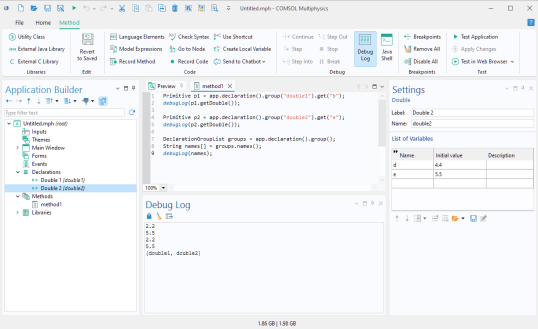
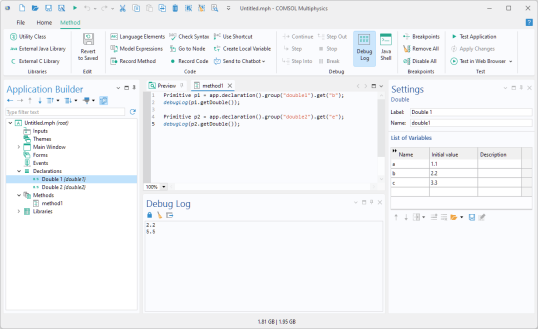
The figures below shows an example of two DeclarationGroup objects double1 and double2 and how to access their variables.
The second figure additionally shows how to retrieve the names of all DeclarationGroup names, using the DeclarationGroupList method names()
A DeclarationGroup implements the generic interface IEntityList<Primitive>. This means it behaves like a typed list, with methods to:
Retrieve a specific entry by name or index: get(String name), get(int index)
In addition, the DeclarationGroup class itself defines the method getType(), which returns the data type of the group.
Since it implements a list interface, you can use a standard Java enhanced for-loop to iterate over its entries:
// Iterate over the entries of the "integer1" Integer declarations node.
int i = 0;
for (Primitive entry: app.declaration().group("integer1")) {
entry.set(i++);
}
Here, each Primitive represents a single entry of the group, such as one integer element inside the array declaration named "integer1".
The Primitive interface encapsulates an individual declaration entry. It is derived from the more general DataSource interface, which is the base abstraction for all data objects in the API. Through Primitive, you can update the value of an entry using one of the overloaded, type-specific set(...) methods, for example, set(int value), set(double[][] value), or set(String[] value). Depending on the declaration type, you can also retrieve values in a type-safe way.
This design allows you to work with declarations in a way that is both object-oriented (via classes and interfaces) and natural for Java developers (using familiar list and iteration patterns).
The following tables list the most important methods for handling declarations.
Declaration and DataSource Methods
Returns the declaration object (Scalar, Array 1D, Array 2D, ChoiceList, or UnitSet) with the specified name.
Returns the list of all declaration groups under the Declarations node. Example: DeclarationGroupList groups = app.declaration().group();
Returns the declaration group with the specified name. Example: DeclarationGroup ints = app.declaration().group("integer1");
DeclarationGroupList Methods
Gets a group by name. Example: DeclarationGroup g = groups.get("integer1");
Gets a group by index (0-based). Example: DeclarationGroup g = groups.get(0);
Returns the names of all groups. Example: for (String n : groups.names()) { … }
DeclarationGroup Methods
Returns the index of an entry (−1 if not found). For example, find the index of the "svar" declaration:
Returns the group’s data type (for example, "String" or "Array1DString"). For example, inspect the data type of the "integer1" group:
Choice List and Unit Set Methods
The methods described in the following table are applicable for both ChoiceList and UnitSet objects. These methods are used to manipulate choice lists and unit sets during runtime.
Example Code
The code below adds the string Aluminum 3004 to a choice list. Note that the choice list index starts at 0, whereas the material tags start at 1 (mat1, mat2, mat3, and mat4).
ChoiceList choiceList = getChoiceList("choicelist1");
choiceList.setListRow("mat4", "Aluminum 3004", 3);
For more information on using choice lists for changing materials, see the book Introduction to the Application Builder.
Unit Set Methods
When the object is a UnitSet the following additional methods are also available:
GraphicsData Methods
When the object is a GraphicsData the following methods are available:
The GraphicsData class has the following properties:
domain | boundary
pointnormal | pointdir | twopoints | none
first | second
Point being picked in the twopoints line entry method.
Example Code
The following code enables data picking for the graphics1 object, connects it to the graphicsdata1 object and sets some properties on the graphicsdata1 object:
app.form("form1").formObject("graphics1").set("datapick", true);
app.form("form1").formObject("graphics1").set("datapicktarget",
    app.declaration("graphicsdata1"));
app.declaration("graphicsdata1").set("edim", "boundary");
app.declaration("graphicsdata1").set("method", "pointdir");