Physics
Consider analyzing stationary heat transfer in the solid rectangular geometry shown earlier. To create a physics interface, for Heat Transfer in Solids, use:
model.physics().create("ht", "HeatTransfer", "geom1");
The first input argument to the create method is a physics interface tag that is used as a handle to this physics interface. The second input argument is the type of physics interface. The third input argument is the tag of the geometry to which the physics interface is assigned.
To set a fixed temperature boundary condition on a boundary, you first create a TemperatureBoundary feature using the following syntax:
model.physics("ht").create("temp1", "TemperatureBoundary", 1);
The first input argument to create is a feature tag that is used as a handle to this boundary condition. The second input argument is the type of boundary condition. The third input argument is the spatial dimension for the geometric entity that this boundary condition should be assigned to. Building on the previous example of creating a 2D rectangle, the input argument being 1 means that the dimension of this boundary is 1 (that is, an edge boundary in 2D).
The next step is to define which selection of boundaries this boundary condition should be assigned to. To assign it to boundary 1 use:
model.physics("ht").feature("temp1").selection().set(new int[]{1});
To assign it to multiple boundaries, for example 1 and 3, use:
model.physics("ht").feature("temp1").selection().set(new int[]{1, 3});
To set the temperature on the boundary to a fixed value of 400 K, use:
model.physics("ht").feature("temp1").set("T0", "400[K]");
The following lines of code show how to define a second boundary condition for a spatially varying temperature, varying linearly with the coordinate y:
model.physics("ht").create("temp2", "TemperatureBoundary", 1);
model.physics("ht").feature("temp2").selection().set(new int[]{4});
model.physics("ht").feature("temp2").set("T0", "(300 + 10[1/m]*y)[K]");
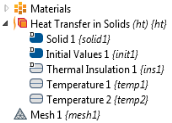
The resulting model tree structure is shown in the figure below.
Use Record Code or any of the other tools for automatic generation of code to learn more about the syntax and methods for other physics interface features and other physics interfaces.
Creating and Removing Model Tree Nodes
Below is a larger block of code that removes, creates, and accesses physics interface feature nodes. It uses the Iterator class and methods available in the java.util package. For more information, see the Java® documentation.
String[] flowrate = column1;
String[] Mw = column2;
java.util.Iterator<PhysicsFeature> iterator =     model.physics("pfl").feature().iterator();
while (iterator.hasNext()) {
  if (iterator.next().getType().equals("Inlet"))
    iterator.remove();
}
if (flowrate != null) {
  for (int i = 0; i < flowrate.length; i++) {
    if (flowrate[i].length() > 0) {
      if (Mw[i].length() > 0) {
        int d = 1 + i;
        model.physics("pfl").create("inl" + d, "Inlet");
        model.physics("pfl").feature("inl" + d).setIndex("spec", "3", 0);
        model.physics("pfl").feature("inl" + d).set("qsccm0", flowrate[i]);
        model.physics("pfl").feature("inl" + d).set("Mn", Mw[i]);
        model.physics("pfl").feature("inl" + d).selection().set(new int[]{d});
      }
    }
  }
}
The need to remove and create model tree nodes is fundamental when writing methods because the state of the model object is changing each time a model tree node is run. In the method above, the number of physics feature nodes are dynamically changing depending on user inputs. Each time the simulation is run, old nodes are removed first and then new nodes are added.
Retrieving the Type of a Physics Feature
The Model Builder always shows the label for the model tree nodes. To get more information about each node, in the Model Builder toolbar click Model Tree Node Text. Then select any combination of options from the list: Name, Tag, and Type.
Name: The descriptive, human-readable label shown in the user interface to help you identify and distinguish it.
Tag: The unique internal identifier (an alphanumeric string) used in method code and model files to reference that feature programmatically.
Type: The class of a feature, which determines its available settings, behavior, and applicable operations.
Since the Name can be changed by the user, and thereby vary from model to model even if the physics is identical, it is not very useful when programming using the API. Instead, the Tag is most frequently used, as in many of the previous examples. However, sometimes the Type is also useful. It gives a human-readable description of a feature that cannot be changed by the user. For example, in the case of a Temperature boundary condition for a Heat Transfer in Solids interface, a call to
model.component("comp1").physics("ht").feature("hs1").getType();
will return the string HeatSource, regardless of which Name is displayed in the Model Builder.