Mesh
The following line adds a Mesh node, with tag mesh1, linked to the geometry with tag geom1:
model.mesh().create("mesh1", "geom1");
You can control the mesh element size either by a preconfigured set of sizes or by giving low-level input arguments to the meshing algorithm.
The following line:
model.mesh("mesh1").autoMeshSize(6);
corresponds to a mesh with Element size set to Coarse. The argument to the method autoMeshSize ranges from 1-9, where 1 is Extremely fine and 9 is Extremely coarse.
To generate the mesh, you call the run method for the Mesh node:
model.mesh("mesh1").run();
Use Record Code to generate code for other mesh operations.
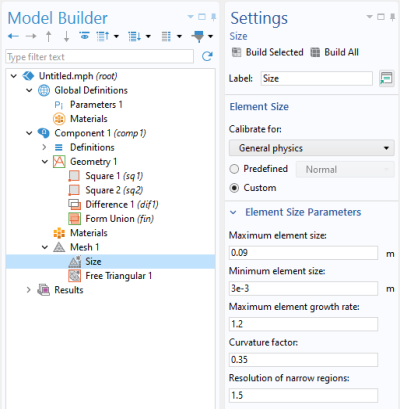
The code below shows an example where the global mesh parameters have been changed.
model.mesh("mesh1").automatic(false); // Turn off Physics-controlled mesh
with(model.mesh("mesh1").feature("size"));
  set("custom", "on"); //   Use custom element size
  set("hmax", "0.09"); //   Maximum element size
  set("hmin", "3.0E-3"); // Minimum element size
  set("hgrad", "1.2"); //   Maximum element growth rate
  set("hcurve", "0.35"); // Curvature factor
  set("hnarrow", "1.5"); // Resolution of narrow regions
endwith();
model.mesh("mesh1").run();
The above example corresponds to the following Mesh node settings:
Note that you can also set local element size properties for individual points, edges, faces, and domains. Use Record Code or any of the other tools for automatic generation of code to learn more about the syntax and methods for other mesh operations.