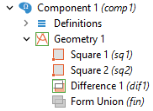
Once the Geometry node is created (see
Creating Model Components and Model Object Nodes) you can add geometric features to the node. For example, add a square using default position (0, 0) and default size 1:
The first input argument "sq1" to the
create method is a tag, a handle, to the square. The second argument "
Square" is the type of geometry object.
The with statement in the above example is used to make the code more compact and, without using
with, the code statements above are equivalent to:
In this way, you have access to the functionality that is available in the geometry node of the model tree. Use Record Code or any of the other tools for automatic generation of code to learn more about the syntax and methods for other geometry operations.
The syntax "c"
+n automatically converts the integer
n to a string before concatenating it to the string "
c".