Parameters and Variables
This code defines a global parameter L with Expression 0.5[m] and Description Length:
model.param().set("L", "0.5[m]");
model.param().descr("L", "Length");
There is an alternative syntax using three input arguments:
model.param().set("L", "0.5[m]", "Length");
You can also use the with syntax to set the Expression and Description for several parameters, for example:
with(model.param());
set("L", "0.5[m]");
descr("L", "Length");
set("wd", "10[cm]");
descr("wd", "Width");
set("T0", "500[K]");
descr("T0", "Temperature");
endwith();
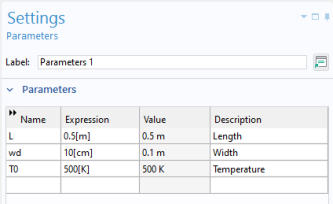
which corresponds to the following Settings window for Global Definitions > Parameters:
Note the with syntax is not supported in the Java Shell window.
Accessing a Global Parameter
You would typically use the Editor Tools window for generating code for setting the value of a global parameter. While in the Method Editor, right-click the parameter and select Set.
To set the value of the global parameter L to 10 cm:
model.param().set("L", "10[cm]");
To get the global parameter L and store it in a double variable Length:
double Length = model.param().evaluate("L");
Note that if you have multiple parameter nodes, the syntax for evaluation is still the same. For example, this code sets the parameter L2 in a Parameters 2 node, with tag par2:
model.param("par2").set("L2", "5[cm]");
To get the parameter L2 and store it in a double variable Length2:
double Length2 = model.param().evaluate("L2");
without any reference to the tag par2.
The evaluation is in these cases with respect to the base Unit System defined in the model tree root node.
To return the unit of the parameter L, if any, use:
String Lunit=model.param().evaluateUnit("L");
To write the value of a model expression to a global parameter, you typically need to convert it to a string. The reason is that model expressions may contain units.
Multiply the value of the variable Length with 2 and write the result to the parameter L including the unit of cm.
Length = 2*Length;
model.param().set("L", toString(Length) + "[cm]");
To return the value of a parameter in a different unit than the base Unit System, use:
double Length_real = model.param().evaluate("L","cm");
For the case where the parameter is complex valued, the real and imaginary parts can be returned as a double vector of length 2:
double[] realImag = model.param().evaluateComplex("Ex", "V/m");
For parameters that are numbers without units, you can use a version of the set method that accepts a double instead of a string. For example, the lines
double a_double = 7.65;
model.param().set("a_param", a_double);
assigns the value 7.65 to the parameter a_param.
Variables
The syntax for accessing and assigning variables is similar to that of parameters. For example, the code:
with(model.variable("var1"));
  set("F", "150[N]");
  descr("F", "Force");
endwith();
assigns the Expression 150[N] to the variable with Name F.
The following code assigns a model expression to the variable f:
with(model.variable("var1"));
  set("f", "(1 - alpha)^2/(alpha^3 + epsilon) + 1");
endwith();
and the following code stores the model expression for the same variable in a string fs.
String fs = model.variable("var1").get("f");