Model Object Tags
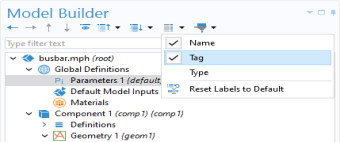
In the model tree and when working with the model object from methods, tags are used as handles to different parts of the model object. These tags can also be made visible in the Model Builder by first clicking the Model Builder toolbar menu Model Tree Node Text and then choosing Tag, as shown in the figure below.
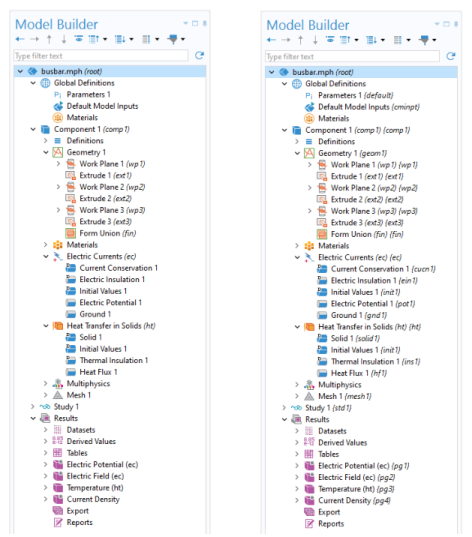
The figures below show an example of a model tree without tags shown in the left figure and with tags shown in the right figure.
In code, the tags are referenced using double quotes. For example, in the following line
model.geom("geom1").create("r1", "Rectangle");
geom1 is a tag for a geometry object and r1 is a tag for a rectangle object. The following sections contain multiple examples of using tags to create and edit parts of a model object.
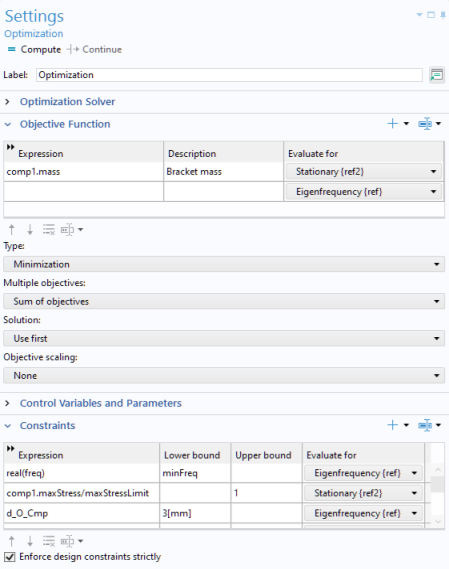
The option Name, available in the Model Tree Node Text menu in the Model Builder toolbar, represents the name used for scoping. The scope names are used to access the different parts of the model object. This is important, for example, when working with global variables for defining the constraints and objective functions for an optimization study. In the figure below, the variables mass and maxStress are referenced by scope names: comp1.mass and comp1.maxStress, respectively.
Using scope names avoids name collisions in cases where there are multiple model components or multiple physics interfaces with identical variable names.