Ctrl+Space for Code Completion
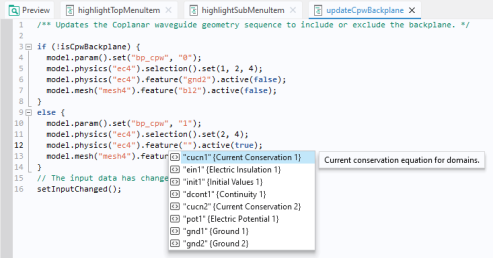
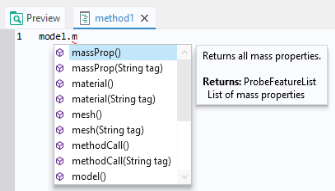
While typing code in the Method Editor, the Application Builder can provide suggestions for code completions. The list of possible completions are shown in a separate completion list that opens while typing. In some situations, detailed information appears in a separate window when an entry is selected in the list. Code completion can always be requested with the keyboard shortcut Ctrl+Space. Alternatively Ctrl+/ can be used to request code completion, which is useful if Ctrl+Space is in use by the Windows operating system such as for certain languages. When accessing parts of the model object, you will get a list of possible completions, as shown in the figure below:
Select a completion by using the arrow keys to choose an entry in the list and double-click, or press the Tab or Enter key, to confirm the selection.
If the list is long, you can filter by typing the first few characters of the completion you are looking for.
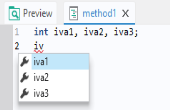
For example, if you enter the first few characters of a variable or method name, and press Ctrl+Space, the possible completions are shown:
In the example above, only variables that match the string iv are shown. This example shows that variables local to the method also appear in the completion suggestions.
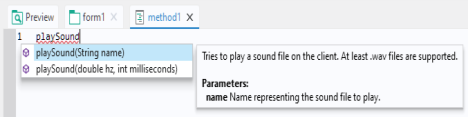
You can also use Ctrl+Space to learn about the syntax for the built-in methods that are not directly related to the model object. Type the name of the command and use Ctrl+Space to open a window with information on the various calling signatures available.
Additional information is also available in the form of tool tips that are displayed when hovering over the different parts of the code.
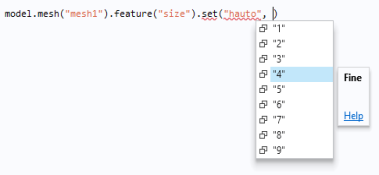
The Method Editor also supports code completion for properties, including listing the properties that are available for a given model object feature node, and providing a list of allowed values that are available for a given property.
The figure below shows an example of code completion for the mesh element size property, where a list of the allowed values for the predefined element sizes is presented.
COMSOL Multiphysics and its add-on modules contain thousands of physics features that you can learn about by using, for example, Record Code, SaveĀ as > Model File for Java, and code completion. The figure below shows code completion for a particular feature in the Electric Currents interface.