Java supports the usual control flow statements if-
else,
for, and
while. You can use the
Language Elements tool to insert template code corresponding to a number of control flow, of or block, statements.
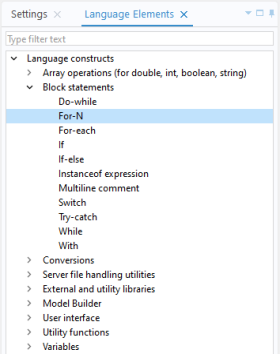
Between curly braces {} you can include multiple lines of code, each terminated with a semicolon. If you only need one line of code, such as in the example above, this shortened syntax is available:
Java supports several different types of for statements. This example uses the perhaps most conventional syntax:
where the local iteration variable looped over is formObject of the type, or class,
FormObject. The collection of objects, in this case
app.form("form1").formObject(), can be an array or other types of lists of objects. Using this syntax, the iteration variable loops over all entries in the collection, from start to finish.
When writing methods in the Method Editor, in addition to the standard Java control flow statement, there is also an optional with statement, specific to the Method Editor, that can be used to make Application Builder code more compact and easier to read (you enable this in
File >
Preferences). A simple example is shown below:
In this case using the with statement has limited value since just one parameter is assigned but for multiple assignments readability increases. See
Parameters and Variables for an example with multiple assignments.
Note that the with statement is only available when writing code in the Method Editor. It is not available when using the COMSOL API for use with Java
®. You can turn off the use of
with statements in the section for
Methods in
Preferences.
The method descr returns the variable description for the last parameter or variable in a
with statement:
An exception is an error that occurs at runtime. The Java® programming language has a sophisticated machinery for handling exceptions and each exception generates an object of an exception class. The most common way to handle exceptions is by using
try and
catch, as in the example below.
where an error dialog is shown in case the file my_file.txt is not found in the application file folder
common.