The Application Builder Window
The Application Builder window is a window that, by default, is placed at the left end of the desktop when you are using the Application Builder. The tree contains nodes for all components (forms, methods, and so on) in the app.
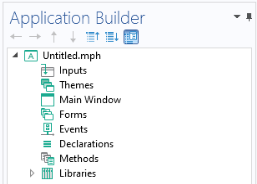
Figure 4-1: The Application Builder window.
Double-clicking a method node in the tree opens its code in an editor tab. If the editor tab associated with the node is already open, the tab is given focus. Right-clicking a node in the tree opens a context menu. This menu contains an Edit option, which also opens the editor. The context menu also contains the standard options for a Model Builder tree node, such as Move Up, Move Down, Copy, and Duplicate.
If the Link with Editor button () in the Application Builder window’s toolbar is selected, then just click a Method node in the application tree to move the focus to its associated editor tab, if it is open.
Selecting a method node in the tree gives focus to the editor tab that is associated with the node, if the editor tab is open. In the same way, if you click an editor tab to give it focus, the corresponding node is selected in the Application Builder window.