File Scheme Syntax
To make applications portable, the Application Builder allows you to use virtual file locations using file schemes. A file scheme can be seen as a pointer to a file on the file system, but the application does not need to know where the file is actually stored (this is set in the Preferences window, see below.)
Different file schemes exist for different purposes:
The user file scheme is for files that should be persistent between different runs of an application by the same user.
The common file scheme behaves in the same way, but is for files that should be shared between all users.
The temp file scheme is for files that should be removed as soon as the application is closed.
The dbfile file scheme is for file versions that are stored in a Model Manager database.
The embedded file scheme is used to store files in the application itself, under Libraries>Files. This can be useful if you want to make the application self-contained and send it to someone else.
The upload file scheme is for files that are uploaded to the application by the user at runtime, such as a CAD file or an experimental data file to which the user browses.
The table below summarizes all available file schemes.
For more information on files in the Libraries node accessible by the embedded:/// syntax, see Libraries.
The table below summarizes the usage of the different file schemes. In the table, a check mark means that this scheme is available and (r) means that it is the recommended scheme. The dbfile file scheme is available for all usages.
(r)
(r)
(r)
(r)
(r)
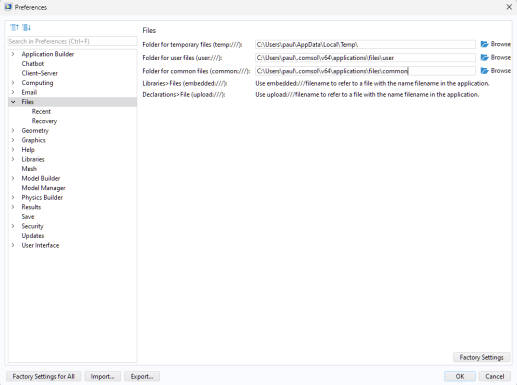
You can set the preferences for the paths to temporary, user, and common files in the Files page of the Preferences window, which is accessible from the File menu, as shown in the figure below.
For a COMSOL Multiphysics installation, a typical default location for the user and common folders for a user named paul is:
C:\Users\paul\.comsol\v64\applications\files
For compiled applications, these folders are located within the corresponding COMSOL Runtime folders, for example:
C:\Users\paul\.comsol\v64runtime\applications\files
In the case of compiled apps, the application preferences, accessible from the About dialog, only allow changing the location of the temporary folder temp. The user and common folders are always located within the COMSOL Runtime folder and cannot be relocated.