A Text object is a text field with default text that is taken from a string variable or an
Information node. The
Settings window for a text object is shown below.
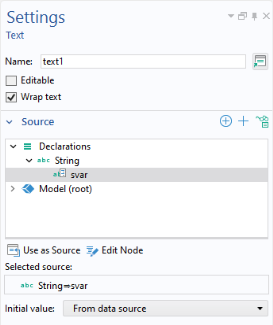
Select a string variable or Information node from the tree in the
Source section and then click
Use as Source. In the
Value field, enter the initial text. By default, the
Initial value text is taken from this field. To instead use the string variable for the
Initial value text, change the
Initial value setting to
From data source.
The Editable checkbox is cleared by default. If selected, the text object can be used, for example, to type comments in a running application. If the text is changed by the user, it is stored in the string variable that is used as the data source, regardless of the
Initial value setting.
The Wrap text checkbox is selected by default. Clear this checkbox to disable wrapping of the text. A scroll bar appears if the text does not fit.