Array Input
An Array Input object has an input table used to enter array or vector-valued input data. An array input object supports arrays as data sources. You can add an optional label, symbol, and unit.
Using an Array Input Object for 3D Point Coordinate Input
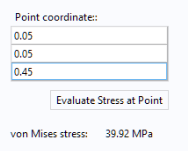
Consider an application where the user enters 3D coordinates for a point where the stress is evaluated. The figure below shows a screenshot from an application with an array input, button, text label, and data display object.
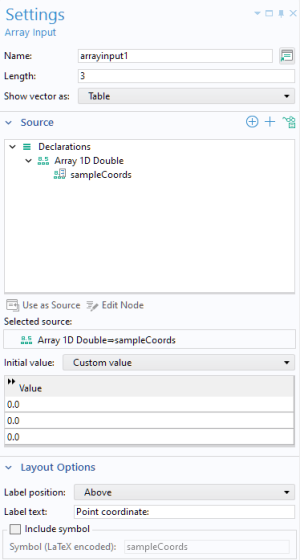
The figure below shows the Settings window of the array input object.
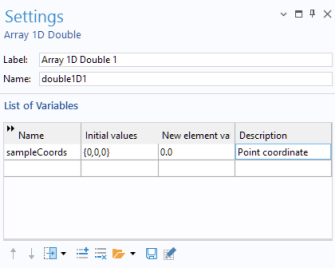
The Array Input form object uses a Source named sampleCoords, which is a 1D Array of type Double. This array is created prior to the creation of the Array Input object by declaring an Array 1D Double with the following Settings.
In the Settings window of the array input object:
In the Length field, enter the length of the array as a positive integer. The default is 3.
From the Show vector as list, choose Table (the default) to show the array components as a table, or choose Components to show each array component as a separate input field with a label.
In the Value table, enter the initial values for the components in the array.
The Layout Options section provides settings for adding optional labels and units to the array input.
In this example, when the user clicks the button labeled Evaluate stress at point, the following method is run for a Cut Point 3D dataset:
with(model.result().dataset("cpt1"));
set("pointx", sampleCoords[0]);
set("pointy", sampleCoords[1]);
set("pointz", sampleCoords[2]);
endwith();
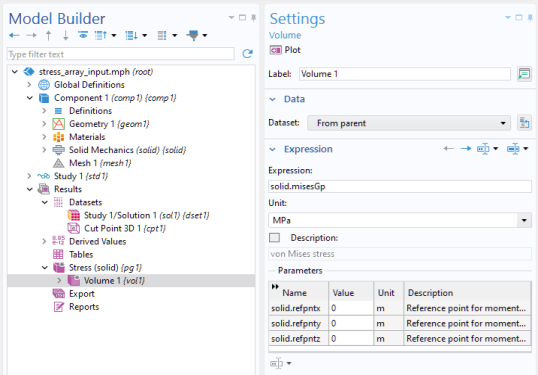
The stress value is displayed using a Data Display form object referencing a Derived Values>Point Evaluation with the expression solid.misesGp, as shown in the figure below.