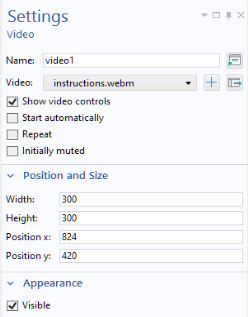
A Video object embeds a video file in a form. The supported video file formats are MP4 (
.mp4), OGV (
.ogv), and WebM (
.webm). However, not all video file formats are supported on all platforms. When running an application by connecting to COMSOL Server from a web browser, which formats are supported depend on the web browser and may vary with different versions of the same web browser. When running an application with the COMSOL Client and with COMSOL Multiphysics, the Internet Explorer version installed on your computer is used as a software component for displaying the video object.
After added to a form, the Video object is represented, in the Form Editor by an image, as shown in the figure below.

The option Show video controls enables the video controls such as Play and Stop.
The option Initially muted is intended for the case where you want to play a video with the sound initially turned off. For example, if the video is set to start automatically, it can be useful to let the user choose whether the sound should be on. The user can enable the sound either from the video controls, if the
Show video controls checkbox is selected, or by right-clicking in the video player.