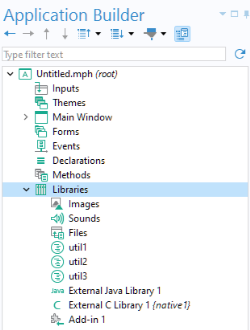
In the application tree, the Libraries node contains images, sounds, and files to be embedded in an MPH file so that you do not have to distribute them along with the application. In addition, the
Libraries node may contain Java
® utility class nodes and nodes for external Java
® (
.jar) and C libraries (
.dll etc.), as well as Add-ins. For more information on using utility classes and external libraries, see the
Application Builder Reference Manual.
Embedded files can, for example, be referenced in form objects or in methods by using the syntax embedded:///file1,
embedded:///file2, and so on. For example, to reference the image file
compute.png, use the syntax
embedded:///compute.png.

To manage files loaded by the user of an application at run time, you have several options, including using
File declarations and
File Import form objects. For more information on files to be loaded at run time,
File,
File Import, and
Appendix C — File Scheme Syntax.