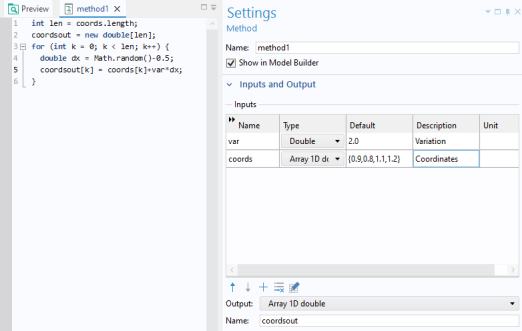
A method is allowed to have several input arguments and one output argument. You define input and output arguments in the Settings window of an active method window. If the
Settings window is not visible, click
Settings in the
Method tab of the ribbon. The figure below shows a method with two input arguments,
var and
coords; and one output,
coordsout. The method adds random values to the array,
coords. The degree of randomness is controlled by the input variable
var. The new values are stored in the array
coordsout.
Standard methods in the Method Editor can only use input and output arguments of the data types defined under the Declarations node. To use more general Java types as method arguments, create a utility class with the desired methods, as described in the next section.