Converting a Command Sequence to a Method
One of the quickest and easiest ways to generate code is to convert a command sequence to a method. In the Form Editor, select Convert to Method from the menu button displayed in the Settings window below an existing command sequence. The command sequence is automatically replaced by an equivalent method. In the same way you can select Convert to Form Method and Convert to Local Method.
Consider a case where you have created a compute button and you want to be alerted by a sound when the computation has finished. Now, we will see how this could be done using the Method Editor (this can also be done without writing code, see later in this section).
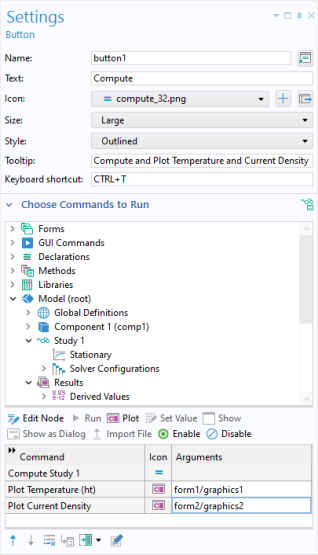
You will also learn how to do this without using the Method Editor later in this section. The figure below shows the Settings window of the Compute button.
Select the Convert to Method option below the command sequence.
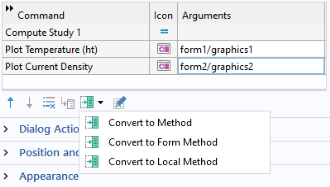
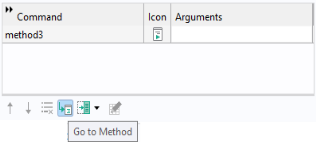
The command sequence in this example is replaced by a method, method3.
Click the Go to Method button. The Method Editor opens with the tab for method3 active.
In the Method Editor, add a call to the built-in method playSound to play the sound file success.wav, available in the COMSOL sound library, by using the syntax shown in the figure below.
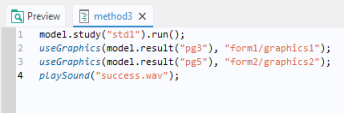
The newly added line is indicated by the green bar shown to the left.
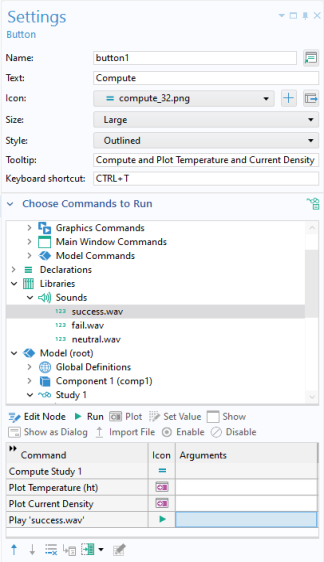
Note that in the example above, you do not have to use the Method Editor. In the command sequence, select the file success.wav under Libraries > Sounds and click the Run command button under the tree, as shown in the figure below.
However, there are many built-in methods that do not have corresponding command sequence nodes. For more information, see Appendix E — Built-In Method Library.
Form Object with Associated Method
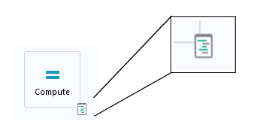
A form object that has an associated method is indicated with a special icon in the Form Editor, as shown in the figure below. In this example, both the checkbox called Find prong length and the Compute button have associated methods.
Pressing Ctrl+Alt+Click on a form object opens its associated method in the Method Editor. If no method is currently linked to the form object, a new local method will be automatically created, associated with the form object, and opened in the Method Editor.
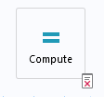
If the associated method has a compile error, then this is shown with a different icon, as shown in the figure below.