The Array 1D node declares one or more named arrays of strings, Booleans, integers, or doubles that you can access from form objects and methods. The number of elements in a 1D array is not restricted in any way, and you can, for example, use a 1D array to store a column in a table with a variable number of rows. The
Settings window contains a single table, where you specify one variable array per row. In the figure below, four string arrays have been declared.
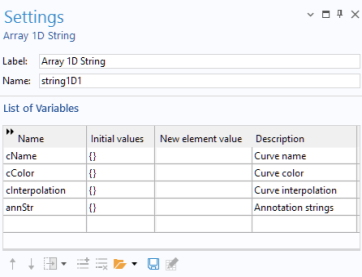
The values in the column New element value are assigned to new elements of the array when a row is added to a table form object. Arrays for doubles, Booleans, and integers are similar in function to arrays of strings.
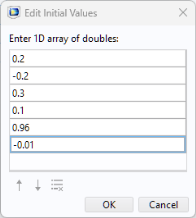
The Initial values can be a 1D array of arbitrary length. To edit the initial values, click the
Edit Initial Values button below the
List of Variables. This opens a dialog where the value of each component can be entered. See the figure below for an example of a 1D array of doubles.
An array definition must start and end with curly braces ({ and
}) and each element must be separated with a comma. When you need special characters inside an array element (spaces and commas, for example), surround the element with single quotes (
'). The table below shows a few examples of 1D arrays: