Scalar
Scalar declarations are used to define variables to be used as strings, Booleans, integers, or doubles.
String
A scalar string variable is similar to a global parameter or variable in a model, but there is a difference. A parameter or variable in a model has the restriction that its value has to be a valid model expression, while a scalar string variable has no such restrictions. You can use a string variable to represent a double, integer, or Boolean by using conversion functions in a method. For more information, see Conversion Methods. You can also use a string variable as a source in many form objects, such as input fields, combo boxes, card stacks, and list boxes.
The figure below shows the Settings window for the string variables solutionState, device, and material.
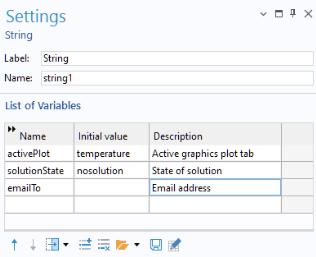
The Label and Name fields are used to distinguish between different declaration settings windows.
String declarations, as well as other declarations, can be loaded and saved from or to a file by using the Load from File and Save to File buttons below the List of Variables table.
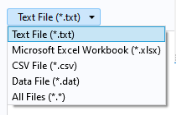
The Load from File and Save to File buttons are used to load and save from/to the following file formats:
Microsoft® Excel Workbook (.xlsx)
-
The drop-down list where these file formats can be selected is shown in the figure below.
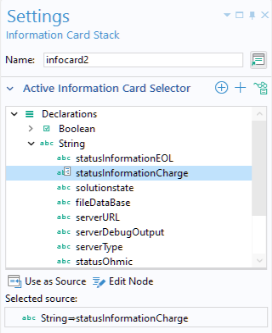
To illustrate the use of declared strings, the figure below shows the Settings window of an information card stack object where the string variable statusInformationCharge is used as the source (Active Information Card Selector).
For more information on using card stacks and information card stacks, see Card Stack and Information Card Stack
Boolean
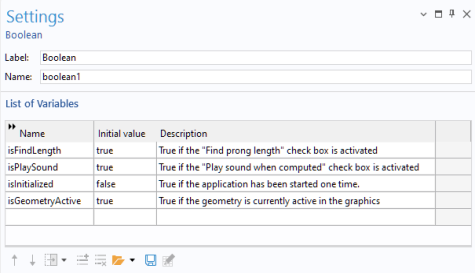
You can use a Boolean variable as a source in checkboxes, other form objects, and methods. A Boolean variable can have two states: true or false. The default value is false. The figure below shows the declaration of two Boolean variables.
Example Code
In the example code below, the Boolean variable bvar has its value controlled by a checkbox. If bvar is true, then Plot Group 4 (pg4) is plotted in graphics1. Otherwise, Plot Group 1 (pg1) is plotted.
if (bvar) {
useGraphics(model.result("pg4"),"graphics1");
} else {
useGraphics(model.result("pg1"),"graphics1");
}
Integer and Double
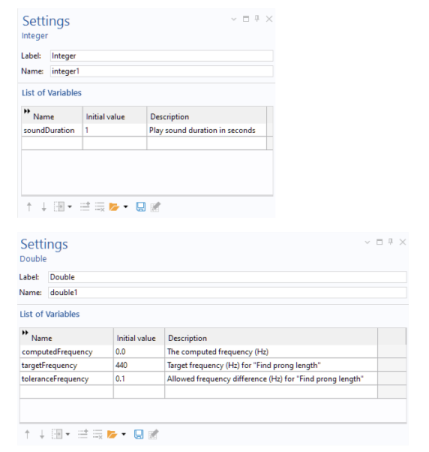
Integer and double variables are similar to strings, with the additional requirement that the value is an integer or double, respectively.