Timer events adds a Timer that controls how often a command sequence is triggered. This functionality can be used to operate an app as a digital twin. Each time a delay has elapsed, a command sequence that you define is run. The command sequence can include method calls, as shown in the figure below.
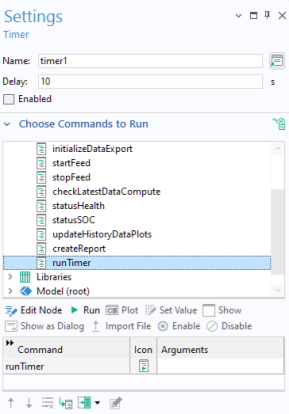
You can use a Timer that accepts input from various external sources such as a hardware sensor, an external database, or a web service. Subsequently, it updates the app based on the acquired data.
In the Delay field, specify the delay time, in seconds, that the timer should wait before executing the command. The default delay is set to 1 second, determining the frequency at which the event is triggered.
The Timer is enabled by default. If you want to disable the triggering of timer events, clear the
Enabled box.