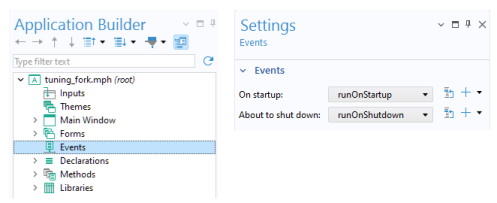
Global or local methods, as well as command sequences, can be associated with the events at startup (On startup) and shutdown (
About to shut down) of an application. To access these events, click the
Events node in the application tree.
Methods used for an On startup event cannot utilize Application Builder functionality related to graphics or user interfaces. This is due to the fact that an
On startup event is run before the full application user interface is loaded. For example, a method that is used for initializing graphics, such as
Zoom Extents, needs to be run as an
On load event for a form and not as a global
On startup event. Another example is showing a dialog using a built-in method such as
confirm. In this case, no dialog will be shown and the operation will simply be ignored.