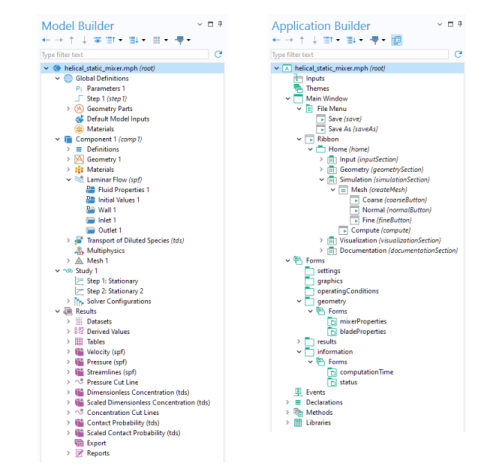
The Application Builder and the Model Builder
Use the Application Builder to create an application based on a model built with the Model Builder. The Application Builder provides three important tools for creating applications: Form Editor, Main Window Editor, and Method Editor.
•
The Form Editor includes drag-and-drop capabilities for user interface components such as input fields, graphics objects, and buttons.
•
The Main Window Editor lets you design a menu bar or a ribbon, as well as a desktop environment consisting of subwindows.
•
The Method Editor is a programming environment that allows you to modify the data structures that represent the different parts of a model or application.
The figures below show the Model Builder and Application Builder windows.
When creating an application, you typically start from an existing model. However, you can just as well build an application user interface and the underlying model simultaneously.
You can easily, at any time, switch between the Model Builder and Application Builder. The model part of an application, as represented by the model tree, is sometimes called an embedded model.
The tools in the Application Builder can access and manipulate the settings in the embedded model in several ways; For example:
•
If the model makes use of parameters and variables, you link these directly to input fields in the application by using the Form Wizard or Editor Tools. In this way, the user of an application can directly edit the values of the parameters and variables that affect the model. For more information, see
Editor Tools in the Form Editor
and
Input Field
.
•
By using the Form Wizard or Editor Tools, you can include a button in your application that runs a study node and thereby starts the solver. In addition, you can use this wizard to include graphics, numerical outputs, checkboxes, and combo boxes. For more information, see
Getting Started with the Application Builder
and
Editor Tools in the Form Editor
.
•
The Data Access tool and the Editor Tools window can be used to directly access low-level settings in the model for use with form objects or in methods. For more information, see
Editor Tools in the Form Editor
,
Data Access in the Form Editor
, and
Editor Tools in the Method Editor
.
•
By using the Record Code and Record Method tools, you can record the commands that are executed when you perform operations within the model tree and its nodes. These will then be available in a method for further editing. For more information, see
Recording Code
.