Layered Material Dataset
Even though the composite laminate is modeled as a surface (2D) geometry, you can visualize the results on a geometry with finite thickness. For this, you use the
Layered Material
dataset.
The aspect ratio of a laminate is often high, so it is difficult to visualize variations in the thickness direction. For this reason, the
Layered Material
dataset provides an option to scale the geometry in the thickness direction.
Using this dataset, you can plot the results in two ways:
•
Plots can be done on a full 3D geometry.
•
You can create slices in the shell at different levels. The slices can be placed at mesh vertices in the thickness direction, at layer midplanes, or at interfaces.
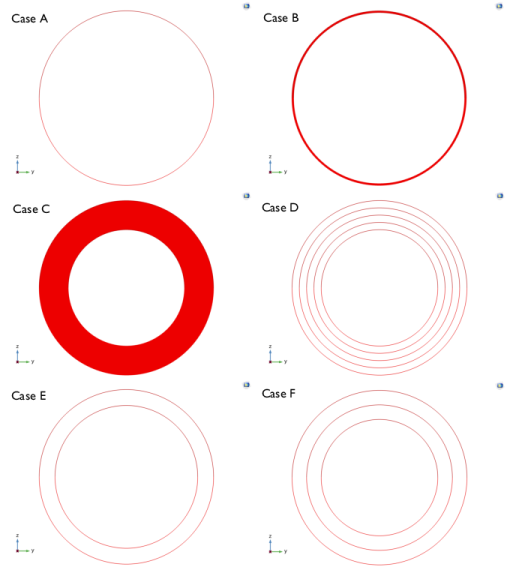
Below is an example of a how a thin composite laminate with two layers can be visualized. The geometry is a cylinder which is viewed along its axis. In
Figure 2-27
, the following evaluation and plotting modes are shown:
•
Case A: The geometry. This is what you see if you do not use the specialized dataset.
•
Case B: Layered material dataset with true thickness (the default). It shows a solid representation, and you would need to zoom in to resolve details.
•
Case C: Layered material dataset with 20x scaling in the thickness direction.
•
Case D: Layered material dataset with 20x scaling in the thickness direction, and slices at the mesh vertices.
•
Case E: Layered material dataset with 20x scaling in the thickness direction, and slices at the layer midplanes.
•
Case F: Layered material dataset with 20x scaling in the thickness direction, and separate slices at the interfaces.
Figure 2-27:
The modeled geometry and various ways to use a Layered Material dataset to evaluate results in a layered material.
In the
COMSOL Multiphysics Reference Manual
: The
Layered Material
dataset