Reaction Engineering (re)
1
On the Reaction Engineering toolbar, click Species
.
2
In the Settings window for Species, locate the Species Name section.
3
In the Species name text field, type E and click Apply.
4
On the Reaction Engineering toolbar, click Species
.
5
In the Settings window for Species, locate the Species Name section.
6
In the Species name text field, type W and click Apply.
Now couple Reaction Engineering (re)
to the Vapor–Liquid System 1
.
7
In the Model Builder window, click Reaction Engineering (re)
.
8
In the Settings window for Reaction Engineering (re)
, click to expand the Mixture properties section.
9
Select the Thermodynamics checkbox.
Specify the phase in Reaction Engineering in accordance to the equilibrium function created.
10
From the Phase list, choose Gas.
Match species in the Reaction Engineering interface with the species available in the thermodynamic system. To be able to calculate the mixture properties from the package, all species need to be matched.
11
Locate the Species Matching section. In the table, match the species in the Vapor–Liquid System 1
with those in Reaction Engineering (re)
.
 .
.
 .
. to the Vapor–Liquid System 1
  .
. .
. , click to expand the Mixture properties section.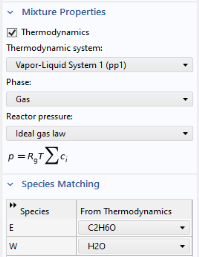
 with those in Reaction Engineering (re)
  .
.