Study 1 — Equilibrium Curve Parameterization
Now add a Stationary study to generate the equilibrium curve, using the defined analytic function. Note that the Reaction Engineering interface is not solved for. Here the Auxiliary sweep functionality in a stationary study is used to compute the equilibrium mole fraction of ethanol in the vapor phase at the bubble point.
1
In the Home toolbar, click Add Study
to open the Add Study window.
2
Go to the Add Study window.
3
Find the Physics interfaces in study subsection. Select to not solve for the Reaction Engineering interface by disabling it in the Solve column.
4
In the Studies subsection, select Stationary
under Preset Studies
.
5
Click Add Study
6
In the Home toolbar, click Add Study
to close the Add Study window.
Step 1: Stationary
1
In the Model Builder window, click the created Study 1
.
2
In the Settings window for Study, type
Equilibrium Curve Parameterization
in the Label text field.
3
Click Step 1: Stationary
under the Equilibrium Curve Parameterization node.
4
In the Settings window for Stationary
, click to expand the Study extensions section, and select the Auxiliary sweep checkbox.
Compute the
xy
equilibrium composition for the bubble point (n = 0) and the dew point (n = 1) as a function of the ethanol mole fraction (x1).
5
Click Add
and select the Parameter name and enter the Parameter value lists as in the figure.
6
From the Sweep type list, choose All combinations.
7
In the Home toolbar, click Compute
.
 to open the Add Study window.
 under Preset Studies
  .
.
 to close the Add Study window.
 .
. under the Equilibrium Curve Parameterization node.
 , click to expand the Study extensions section, and select the Auxiliary sweep checkbox.
 and select the Parameter name and enter the Parameter value lists as in the figure.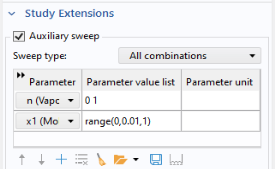
 .
.